
Packages
durable_queue_transfer
Uploads and downloads for durable_queue that keep going after the user minimises or closes the app.
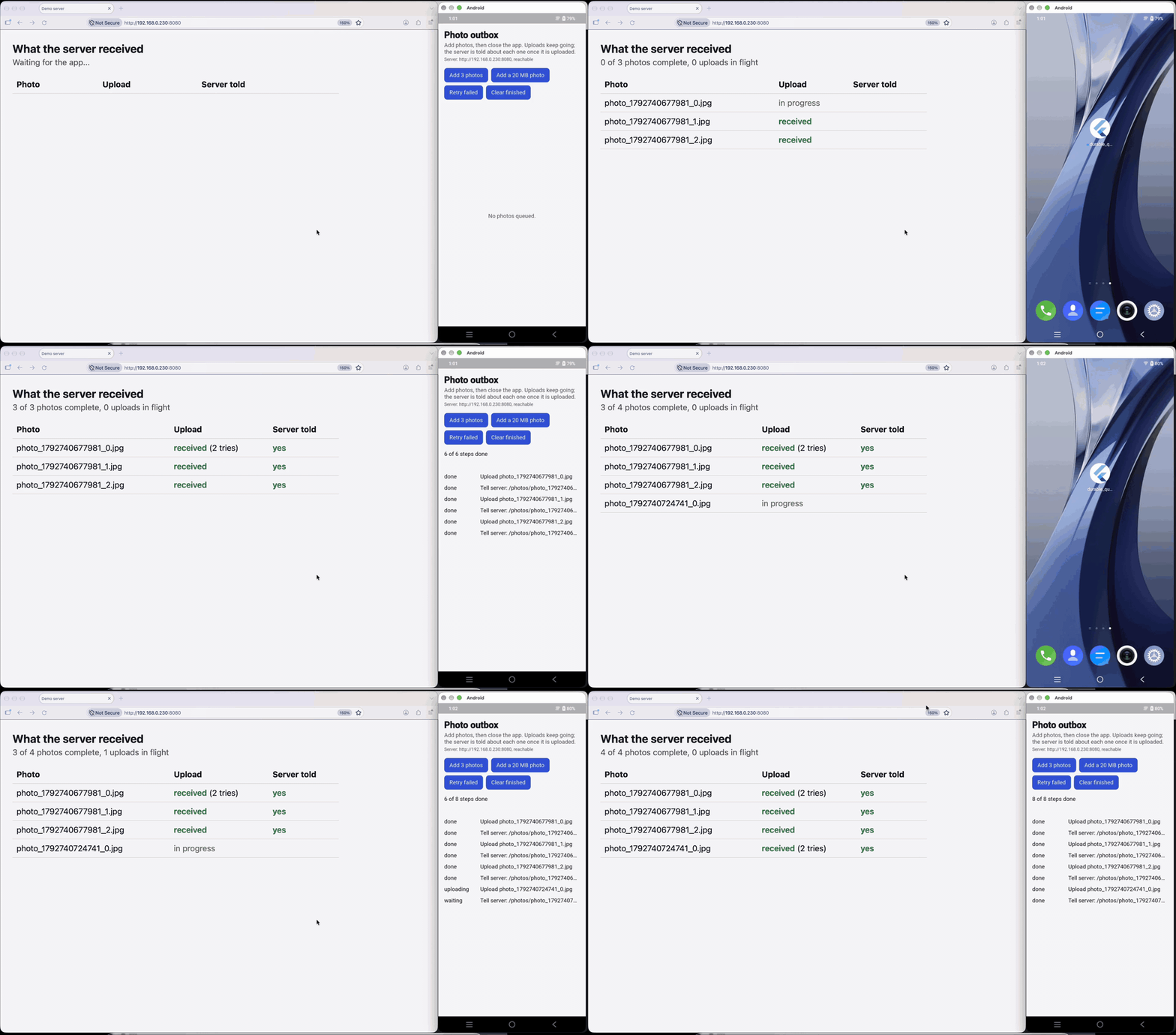
Full videos on real phones: iPhone (78 s) · Android (103 s). Photos are queued, the app goes to the home screen, and every upload still reaches the server, including ones whose first try the server failed on purpose.
The operating system runs the transfer, through background_downloader: a background URLSession on iOS, WorkManager or a user-initiated data transfer job on Android. The queue keeps the bookkeeping: retries with backoff, priorities, rate limits, dependencies ("upload the photo, then tell the server"), deduplication, and a record of every task that survives restarts.
How it works
- Your handler calls
transfers.start(context, UploadTask(...))and returns. The transfer is handed to the operating system, and the queue task is handed off: it stays running, waiting for the result, without holding a worker slot. - The user can leave the app. The transfer continues.
- When it ends, its result becomes the queue task's outcome: success completes the task, a failure fails it so your retry rules decide (a retry starts a new transfer), and a transfer cancelled by the user cancels the task. Tasks that depend on it run next.
- If the app was closed when the transfer ended, the result is picked up at the next launch, when
transfers.attach()runs.
Install
dependencies:
  background_downloader: ^9.6.4
  durable_queue: ^0.5.4
  durable_queue_sqlite: ^0.2.2
  durable_queue_transfer: ^0.1.0
Requires Flutter 3.47 or later (as background_downloader does). Follow background_downloader's setup: on Android, Kotlin 2.1.0 or later; iOS 14 or later, HTTPS by default. Use storage that survives restarts, such as durable_queue_sqlite.
Usage
import 'package:background_downloader/background_downloader.dart';
import 'package:durable_queue/durable_queue.dart' hide TaskStatus;
import 'package:durable_queue_transfer/durable_queue_transfer.dart';

final transfers = QueueTransfers(
  queue,
  onComplete: (result) async {
    // Runs before the queue task completes. If it throws, the task fails
    // with that error and is retried by your rules.
    await photos.saveServerId(result.queueTaskId, result.responseBody);
  },
);

queue.register<PhotoUpload>(
  type: 'photo_upload',
  decoder: PhotoUpload.fromJson,
  retryIf: isRetryableTransferError,
  handler: (task, context) async {
    await transfers.start(
      context,
      UploadTask(
        url: 'https://api.example.com/photos',
        filename: task.fileName,
        baseDirectory: BaseDirectory.applicationDocuments,
        headers: {
          'Authorization': 'Bearer ${await auth.token()}',
          if (context.idempotencyKey != null)
            'Idempotency-Key': context.idempotencyKey!,
        },
      ),
    );
  },
);

await transfers.attach(); // once per launch, in the app's main isolate
await queue.start();

await queue.enqueueChain([
  PhotoUpload('beach.jpg'),
  TagPhoto('beach.jpg'), // a normal task; runs after the upload succeeded
]);
Both background_downloader and durable_queue export a TaskStatus; hide one of them.
startgives the transfer an id made of the queue task id and the attempt, and the groupdurable_queue(groupto change it). Everything else on theUploadTaskorDownloadTaskis kept: file, URL, headers, fields, notifications.onCompletegets the HTTP status, response body, and headers whenbackground_downloaderdelivers them live. For a transfer that finished while the app was closed and is found inbackground_downloader's records at the next launch, they are not available.isRetryableTransferErrorretries connection errors, HTTP 408, 425, 429, and 5xx, lost transfers, and errors fromonComplete. It does not retry 404 (notFound), other 4xx responses, invalid URLs, or file errors such as a missing file.- Cancelling the queue task (
queue.cancel(id)orcancelGroup) cancels the transfer.
What attach does
Call it once per launch, in the app's main isolate, before or after queue.start():
- registers for
background_downloaderstatus updates of the group and turns on its record keeping for the group; - asks for updates stored while the app was not running;
- after
settleDelay(5 seconds), callsFileDownloader.rescheduleKilledTasks(rescheduleKilled: falseto skip; note that it applies to every groupbackground_downloadertracks) andreconcile, which applies finished transfers from the records and fails hand-offs whose transferbackground_downloaderdoes not know any more (afterlostAfter, 2 minutes) withTransferLostException, so they retry.
reconcile() is safe to call again, for example when the app returns to the foreground.
What the user can do
| The user… | The transfer | The queue task |
|---|---|---|
| keeps the app open | runs | completes or fails as soon as it ends |
| minimises the app | keeps running (iOS: background URLSession; Android: background job) |
gets the result live if the app is still alive, otherwise at the next launch |
| has the app closed by the system | keeps running | gets the result at the next launch |
| force-quits the app (swipes it away) | may be stopped by the system without notice | at the next launch, rescheduleKilledTasks restarts it if background_downloader can; otherwise the hand-off is reported lost and the task retries |
So "it will be done" holds as long as the app is eventually opened again and the retry budget is not used up. A force-quit can delay a transfer until the next launch; it does not lose the task.
Long transfers
- iOS: a background transfer must finish within the system's resource timeout, 4 hours by default (see
background_downloader's configuration). - Android: a normal background job is stopped after 9 minutes. For large downloads set
allowPause: trueorTransferHint.largeFile, which resumes across those cycles; on Android 14 and laterpriority: 0runs the transfer as a user-initiated data transfer job. Seebackground_downloader's parameters. - Uploads must come from a file on disk. Pass
filenamewithbaseDirectory/directoryrather than an absolute path, since app container paths can change between launches.
Retries
Let the queue retry: keep retries on the UploadTask/DownloadTask at 0 (the default) and give the queue task a retry policy. A retry starts a new transfer with a new id, and the attempt counts like any other. background_downloader's own retries happen inside one queue attempt and only while the app runs.
Notifications and progress
Configure them in background_downloader for the group, for example:
FileDownloader().configureNotificationForGroup(
  QueueTransfers.defaultGroup,
  running: const TaskNotification('Uploading', '{filename}'),
  complete: const TaskNotification('Uploaded', '{filename}'),
  progressBar: true,
);
Progress callbacks for the group can be registered in background_downloader too; QueueTransfers only uses status updates.
Limits
- Results are applied in the app's main isolate (live, or at the next launch). A background job such as the one from
durable_queue_workmanagerdoes not apply them, so a task that depends on a transfer runs once the app has run after the transfer ended. - Delivery stays at least once. If the app dies after a transfer succeeded but before the result was recorded, and
background_downloaderno longer has a record of it, the hand-off is reported lost and the upload runs again. Make the server side idempotent, for example by sending the task'sidempotencyKeyas a header, as above. - Use the group only for transfers started by
QueueTransfers. - Mobile platforms are the target.
background_downloaderalso runs on macOS, Windows, and Linux, where transfers stop with the app.
With other durable_queue packages
durable_queue_sqlite: storage that survives restarts.durable_queue_workmanager: runs your other tasks in background jobs. Transfers do not need it.durable_queue_flutter: widgets that show task status.durable_queue_dio: retry rules and queued requests for normal HTTP calls.
Contributing
Issues and pull requests: github.com/boffincoders/durable_queue. See CONTRIBUTING.md.
This page is packages/durable_queue_transfer/README.md in the repository. Suggest a change.